Note
This page covers the architectural decisions and design rationale behind flow. For a deep technical reference, see the architecture docs on DeepWiki.
Last updated: August 2026 · Current release: v2.1.1
Flow is a workflow manager for developers who work across many projects. One interface for all your scripts, secrets, and automation, no matter the stack. This document covers the core architectural decisions and how the pieces fit together.
Why Flow
Most projects come with their own Makefile, npm scripts, or shell scripts, each with different conventions, flags and undocumented quirks. AI-generated tools and side projects have made this worse. The real cost isn’t running the scripts; it’s remembering how everything works every time you switch contexts.
Flow sits above your projects, not inside them. One place to see, run, and compose everything, regardless of what’s underneath.
Design Philosophy
- Developer-Centric: Flow should be designed with developers in mind, providing a powerful yet intuitive interface for managing automation tasks.
- Composable: Flow should allow users to compose complex workflows from simple, reusable executables, enabling cross-project automation and collaboration.
- Discoverable: Flow should make it easy to find and run executables across multiple projects and workspaces, with a focus on discoverability and usability.
- Local-first: Flow should be able to be run entirely on a local machine, with no external dependencies or cloud services required.
- Malleable: Flow should be easily extensible and customizable, allowing users to adapt it to their specific needs and use it in a variety of contexts.
System Overview
Flow’s architecture centers on a CLI-first design where the Go-based CLI engine handles all business logic, with other interfaces acting as presentation or integration layers.
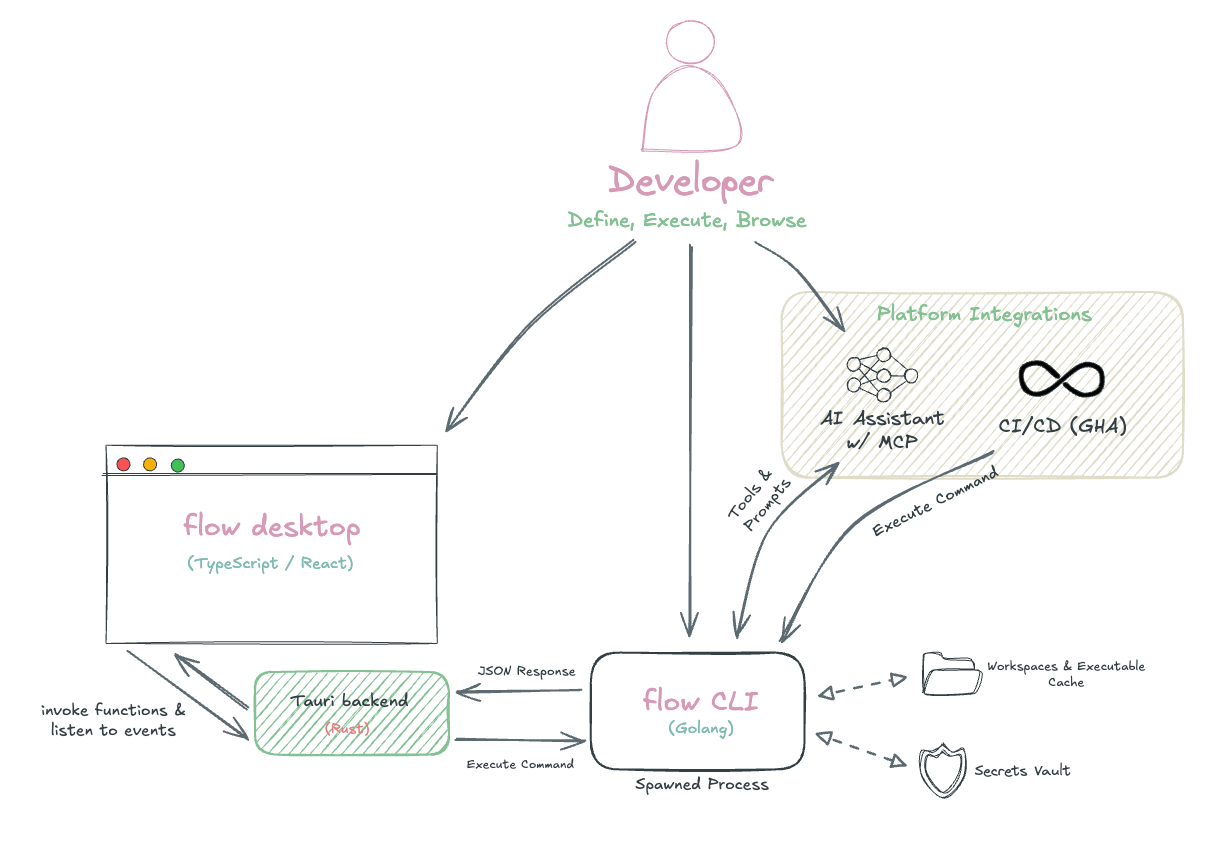
The desktop app and other interfaces communicate with the CLI through process execution, with each user action spawning a discrete CLI command. Because of this, it’s important that CLI operations are fast and efficient, which is achieved through caching and optimized data integrations.
Technical Stack
Core Languages
- Go - CLI engine, business logic, and execution runtime
- TypeScript/React - Desktop frontend with type-safe CLI communication
- Rust - Desktop backend via Tauri framework
User Interface
- Terminal: Bubble Tea with custom tuikit component library
- Desktop: Tauri + Mantine UI for VSCode-like interface
- CLI: Cobra for command structure and auto-completion
Core Libraries
- YAML Processing: yaml.v3 for YAML parsing and serialization
- Process Management: mvdan/sh for shell execution
- Expression Engine: Go’s
text/template+ Expr for conditional logic and templating - Markdown Rendering: Glamour and react-markdown for auto-generated documentation UI viewers
The interface, over time
flow started as a terminal UI and the shape of it has changed a lot. These are the same
browse view roughly a year apart.
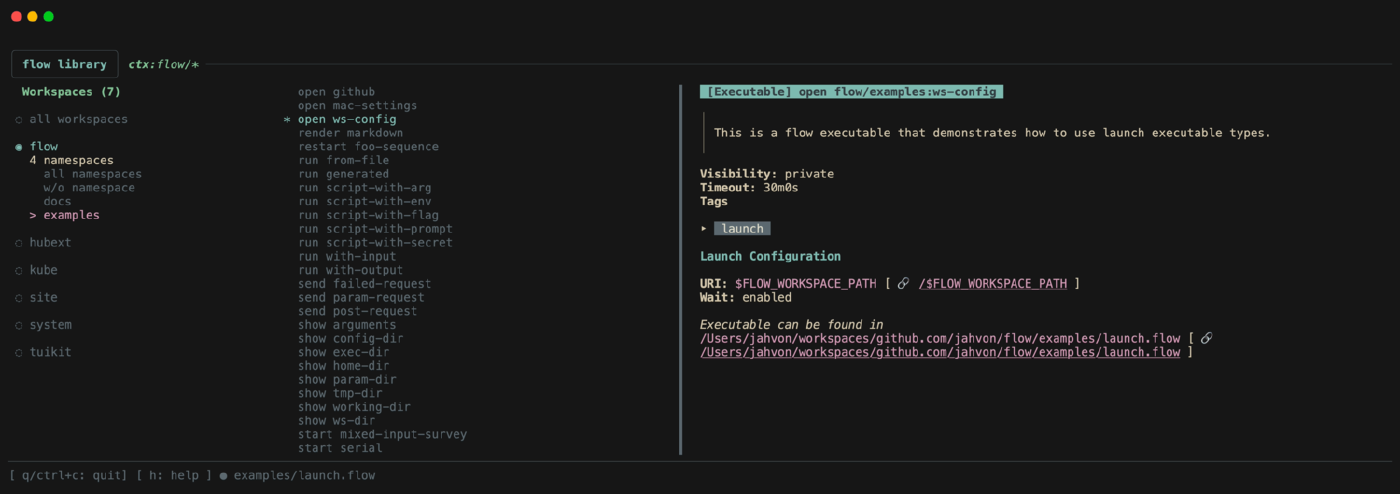
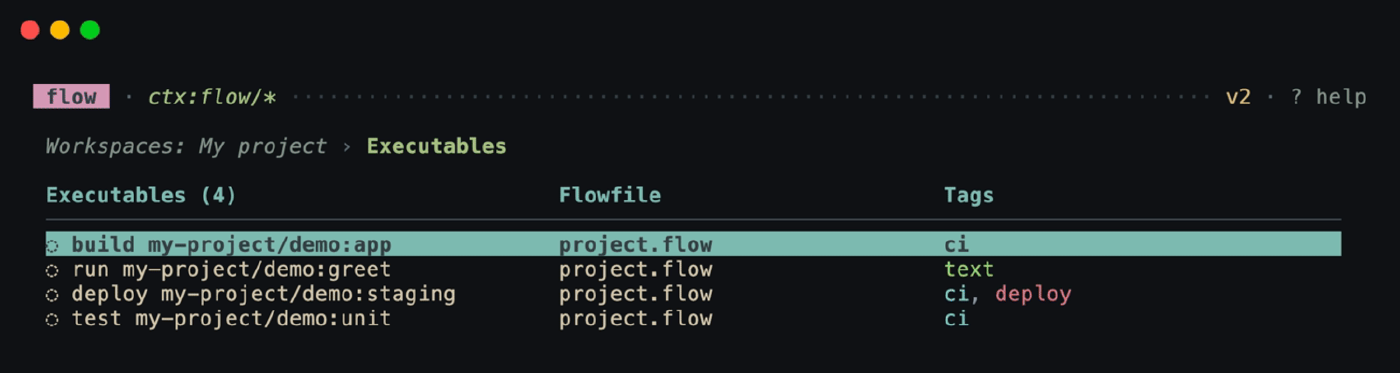
The terminal UI is built on Bubble Tea and Glamour, with most views defined in the tuikit component library. The desktop experience is Mochi, which drives the same binary as a sidecar rather than reimplementing anything.
Resources
- Documentation - quickstart, concepts, AI tools
- GitHub Repository - examples
- DeepWiki Architecture Reference
- Discord
Install with brew install flowexec/tap/flow, or:
curl -sSL https://install.flowexec.io | bash